A CRM is built for sales teams. When you sell on your own on LinkedIn, it quickly becomes a second inbox to keep up to date. There is a simpler way: track your prospects where the conversations happen.
The problem with CRMs for freelancers
A CRM requires you to copy over every contact, every conversation, every date. On LinkedIn, where everything happens in the inbox, that data entry rarely gets done: the CRM stays empty, and tracking falls back on memory.
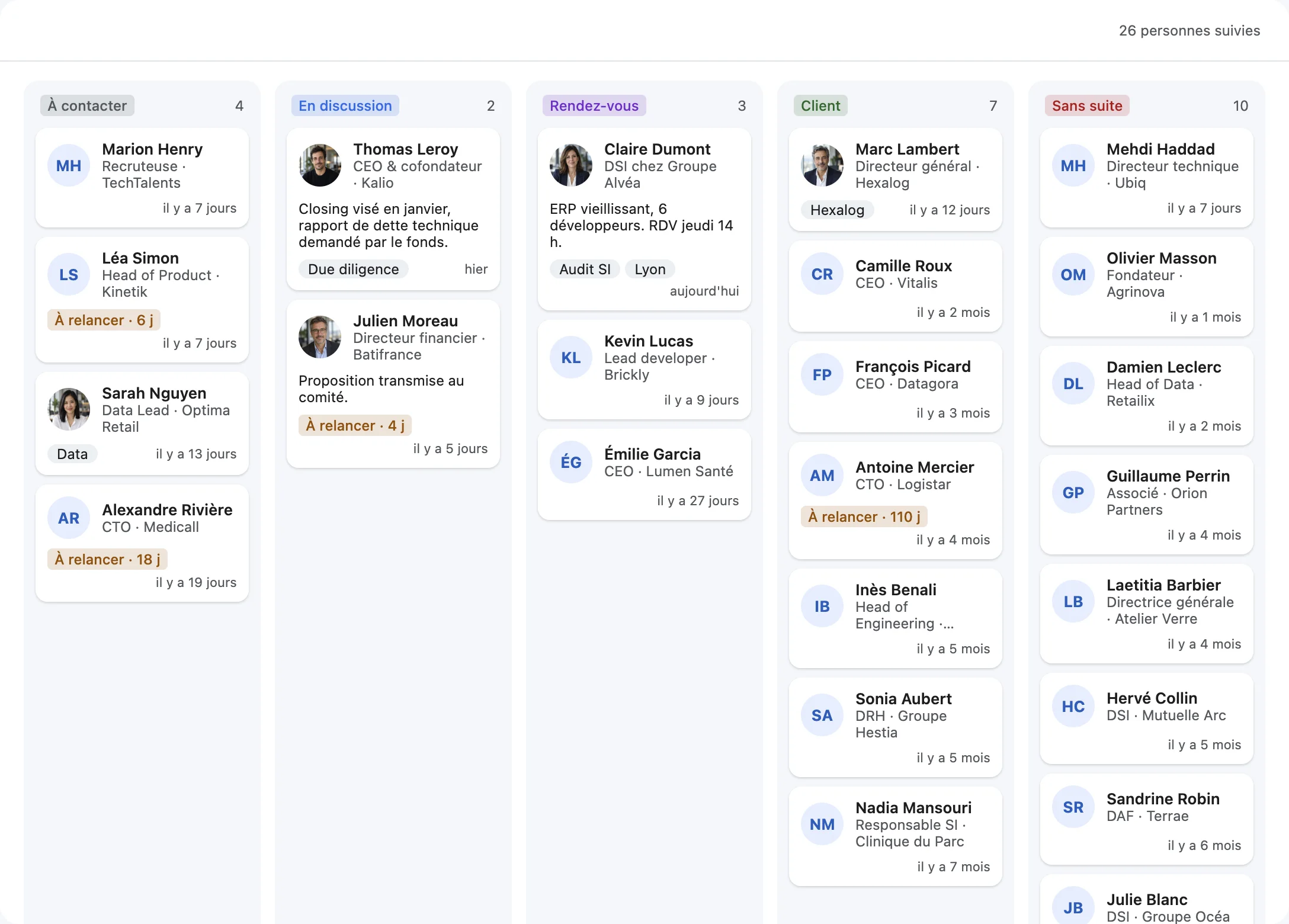
Five stages are enough
| Stage | What it means | Next action |
|---|
| To contact | Person identified, no real conversation yet | Personalized first message |
|---|
| In discussion | A conversation has started | Qualify the need, suggest a call |
|---|
| Meeting | A call or meeting is scheduled | Prepare, then send a proposal |
|---|
| Client | Deal signed | Deliver, ask for a recommendation |
|---|
| Closed lost | No need or not the right time | Come back in a few months |
|---|
Adapt the names to your business: a recruiter will use “Candidate”, “Interview”, “Placed”; a consultant “Proposal sent”, “Engagement”.
What to keep for each contact
- The stage they are at.
- A note: need, budget, context (two lines are enough).
- Tags to filter by: industry, city, company size.
- A dated reminder when an action is planned (“call back after their board meeting on the 12th”).
The weekly review
Once a week, go through your board column by column. Any card that hasn't moved in two weeks deserves an action: a follow-up, a meeting, or a move to “Closed lost”. It's this review, more than the tool, that moves deals forward.
DiscussIn: the CRM that fills itself
In DiscussIn, your sales pipeline lives right next to your conversations: each person has a card with their stage, private notes, tags and a reminder. A board view shows all your prospects; drag a card from one stage to the next. Columns can be renamed, added and reordered. Nothing to re-enter: the card is linked to the LinkedIn conversation.
Sales pipeline
Can you use LinkedIn as a CRM?
LinkedIn alone offers neither stages nor private notes on your conversations. With a tool like DiscussIn, your inbox becomes a lightweight LinkedIn CRM: stages, notes, tags and reminders on every contact.
When should you switch to a real CRM?
When several people sell together, or when your sales mostly go through other channels (email, phone). For a freelancer who sells mostly on LinkedIn, a pipeline built into the inbox is often enough.
Try DiscussIn for free
7 days free, no credit card required. Then €29, one time. No subscription.